

USB-C does not mean fast charging. Here is the right charger for your iPhone or iPad
Two USB-C cables can look identical and behave differently, but the charger and device limit usually decide iPhone charging speed. Here is the practical buying guide.
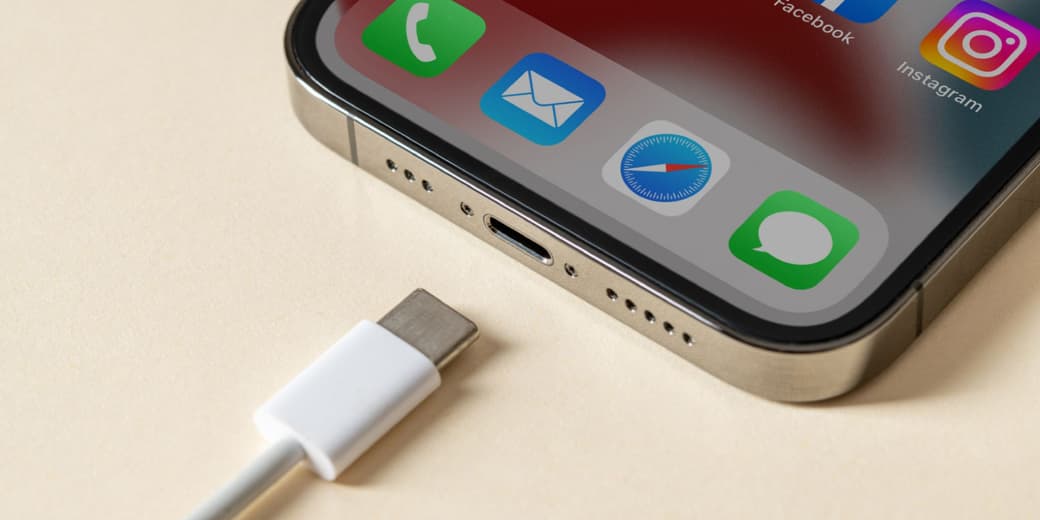
tells you the shape of the connector.
It does not tell you how fast a device will charge, how quickly a cable transfers files, whether video output works, or how much power a multi-port charger can deliver while every port is occupied.
That is why two cables can look identical and behave very differently.
There is also a popular myth worth killing early: a cheap but properly made USB-C cable does not automatically slow an iPhone 15 Pro. For iPhone charging, the power adapter and support are usually the bigger limits. A costly cable may transfer data much faster while charging the phone at exactly the same speed.
The connector is shared. The capabilities are not.
What you need to know
USB-C is a connector, not a speed . Fast wired charging requires a USB Power Delivery charger. iPhone 12 through iPhone 16 models generally need at least a 20W USB-C adapter for Apple's fast-charge target. iPhone 17, 17 Pro, and 17 Pro Max can use a 40W or higher adapter for Apple's faster 20-minute target. iPhone Air and iPhone 17e use a 20W or higher adapter for their fast-charge target. iPad Pro with M5 needs a 60W or higher compliant adapter for Apple's fastest advertised charge. A USB-A charger can limit iPhone 15 and later to 7.5W. Cable data speed and charging power are separate specifications.
What actually controls charging speed?
Four parts negotiate the result: the device's maximum supported input, the charger's available output and supported protocols, the cable's power capability, and heat, battery level, and current device use.
The phone or tablet takes only the power it is designed to accept. Connecting an iPhone to a 100W MacBook charger does not force 100W into the battery.
A reputable high- USB-C Power Delivery charger is therefore safe to use with a lower-power Apple device. The device requests what it needs.
The phrase "100W charger" describes what the adapter can provide, not what it will aggressively pour into everything nearby.
Which charger does an iPhone need?
Apple says iPhone 12 and later models need a 20W or higher USB-C power adapter for .
For iPhone 15 and later, use a USB-C to USB-C cable. Earlier compatible iPhones use a USB-C to Lightning cable.
Apple's current guidance separates the newest models. iPhone 17, iPhone 17 Pro, and iPhone 17 Pro Max use a 40W or higher USB-C adapter for up to 50 percent in around 20 minutes under Apple's test conditions. iPhone Air and iPhone 17e use a 20W or higher adapter for up to 50 percent in around 30 minutes. iPhone 12 through iPhone 16 families meet Apple's fast-charge requirement with a 20W or higher USB-C Power Delivery adapter.
A larger charger may be useful if it also powers an iPad or laptop. It will not make an older iPhone exceed its own charging limit.
Which charger does an iPad need?
iPad charging limits vary by model.
Apple specifically says the iPad Pro with M5 can reach 50 percent in around 30 minutes with a compliant 60W or higher USB-C adapter and a suitable cable.
Other USB-C iPads can safely use higher-wattage adapters, including MacBook chargers, but they draw power according to their own limits. The fastest useful adapter therefore depends on the exact iPad model.
Check the model under Settings, General, About, then verify Apple's specifications.
Do not assume the small charger in the box is the maximum the iPad can accept. Manufacturers sometimes include a slower adapter than the device's peak capability, which is a marvellous way to make an accessory sale feel like a discovery.
What is USB Power Delivery?
USB Power Delivery, often written as USB-PD, is the charging protocol that lets a device and charger negotiate voltage and power safely.
Without the right protocol, a charger may fall back to a slower output even when a large wattage is printed on the casing.
When buying a charger, look for USB Power Delivery support, enough output on the specific USB-C port you will use, clear power-sharing information for multi-port models, recognised safety certification, and a reputable manufacturer and warranty.
Terms such as "fast," "turbo," and "super" are marketing adjectives. USB-PD is a technical feature.
Can a cable slow charging?
Yes, but the common explanation is often sloppy.
A damaged, non-compliant, USB-A-based, or very low-power cable can limit charging. A cable without the required electronic marker can also limit very high-power charging above certain levels.
For an iPhone, however, a normal compliant USB-C cable with adequate power support is usually enough. You do not need a 40Gbps Thunderbolt cable to charge an iPhone quickly.
The cable included with recent iPhones supports fast charging, even though its data transfer speed may be limited to USB 2 speeds.
Charging rating tells you how much power the cable can carry. Data rating tells you how quickly it can move files. Video support tells you whether it can connect to a display. Thunderbolt support adds much higher data capability and extra features.
A cable can be excellent for charging and slow for file transfers. That is not a contradiction.
Why is iPhone 15 Pro data transfer confusing?
The iPhone 15 Pro and later Pro models can support USB 3 data transfers up to 10Gbps with a compatible USB 3 cable.
The cable supplied in the box is designed for charging and basic data transfer. It does not unlock the phone's maximum USB 3 speed.
So a photographer moving large ProRes files may need a faster cable. Someone only charging the phone does not.
Buying a premium data cable for charging alone is like hiring a rally driver to reverse out of a parking space. Impressive credentials, same destination.
Why does a multi-port charger become slower?
A charger may advertise 65W, 100W, or more as its total output.
When several devices are connected, that power is often divided among the ports. A 65W charger might provide 45W to one port and 20W to another, or use a different split depending on the devices.
Read the small power-allocation diagram before buying.
This matters when charging an iPad and iPhone together. The adapter may have enough total power, but the port assigned to the iPad may not receive the wattage needed for its fastest rate.
Unplugging one device can sometimes make the other charge faster.
Why does the phone still charge slowly with the right equipment?
Fast charging slows naturally as the battery fills. The highest rate usually occurs when the battery is low, then tapers to reduce heat and battery stress.
Charging can also slow because the phone is hot, you are gaming or recording video, the screen is bright, the battery is nearly full, optimised charging is delaying the final portion, a multi-port charger is sharing power, the wall adapter is connected through a weak extension or hub, the cable or connector is damaged, or the device has displayed a Slow Charger warning.
Heat is especially important. A powerful charger cannot negotiate with physics.
The practical buying guide
For most recent iPhones, buy a reputable 20W or 30W USB-C Power Delivery charger and use the included or another compliant USB-C cable.
For iPhone 17, 17 Pro, or 17 Pro Max, choose a 40W or higher USB-C Power Delivery charger if you want Apple's fastest advertised wired charging.
For iPhone plus iPad, a 65W or higher dual-port charger is a useful starting point, but verify how power is divided when both ports are active.
For iPad Pro with M5, use a compliant 60W or higher USB-C adapter for Apple's fastest advertised charging target.
For fast file transfers from a Pro iPhone, buy a cable explicitly rated for USB 3.2 Gen 2 at 10Gbps or better. Do not assume the charging cable in the box provides that data speed.
For safety, avoid unbranded adapters with vague specifications, loose pins, poor insulation, or impossible wattage claims. Charging speed is not worth turning a bedside table into a small electrical experiment.
The tecMAMBO verdict
USB-C solved the problem of incompatible connector shapes. It did not solve confusing specifications.
For charging, match the device with a reputable USB Power Delivery adapter and enough wattage. For data, buy the speed you actually need. For a multi-port charger, read the power split.
Do not buy a Thunderbolt cable because it sounds fast when your only job is charging an iPhone. Do not buy a random charger because the port fits.
The plug is universal. Common sense remains an optional accessory.
FAQ
What wattage charger does an iPhone 15 need?
Apple recommends a 20W or higher USB-C Power Delivery adapter for fast charging. A higher-wattage compliant charger is safe, but the iPhone controls how much power it draws.
Does iPhone 15 Pro charge faster with a Thunderbolt cable?
Not necessarily. A Thunderbolt cable provides faster data transfer and additional capabilities. A standard compliant USB-C cable can already support the phone's fast charging needs.
Why does my iPhone say Slow Charger?
The adapter may provide too little power, a USB-A connection may be limiting output, a multi-port charger may be sharing power, or the phone may be charging through a hub or vehicle port.
Can I use a MacBook charger with my iPhone?
Yes. A compliant USB-C Power Delivery MacBook charger can safely charge an iPhone. The iPhone requests only the power it supports.
What charger does an M5 iPad Pro need?
Apple recommends a compliant 60W or higher USB-C adapter and a suitable cable for its fastest advertised charge to 50 percent in around 30 minutes.
Is every USB-C cable the same?
No. Cables differ in charging power, data speed, video support, durability, and certification even when the connectors look identical.
Sources
The port shape is only the start of the charging story.
Ask MAMBO
Have a plain-English question about this topic? Send it in and we may answer it in a future guide.
Ask a questionRelated reading
 MAMBO Take
India wants to lock in electronics manufacturing until 2041, and Apple is a major reason why
India proposes extending tax exemptions for foreign electronics suppliers to 2041 as it scales smartphone, laptop, tablet and wearable manufacturing.
 MAMBO Take
Apple's 2026 iPhone plan could leave budget buyers waiting until 2027
A split launch would turn Apple's biggest 2026 phone event into a premium-only season and push value-conscious buyers toward older iPhones or Android.
 MAMBO Explains
7,000mAh phone batteries are becoming normal, but capacity is not the whole story
The OnePlus N6x confirms that huge batteries are reaching affordable phones. Higher-density chemistry helps the trend, but efficiency and health still decide the experience.