

Android 17 app Bubbles show why Google still understands multitasking better than Apple
Android 17 lets users turn almost any app into a floating Bubble that stays within reach while another app remains open.
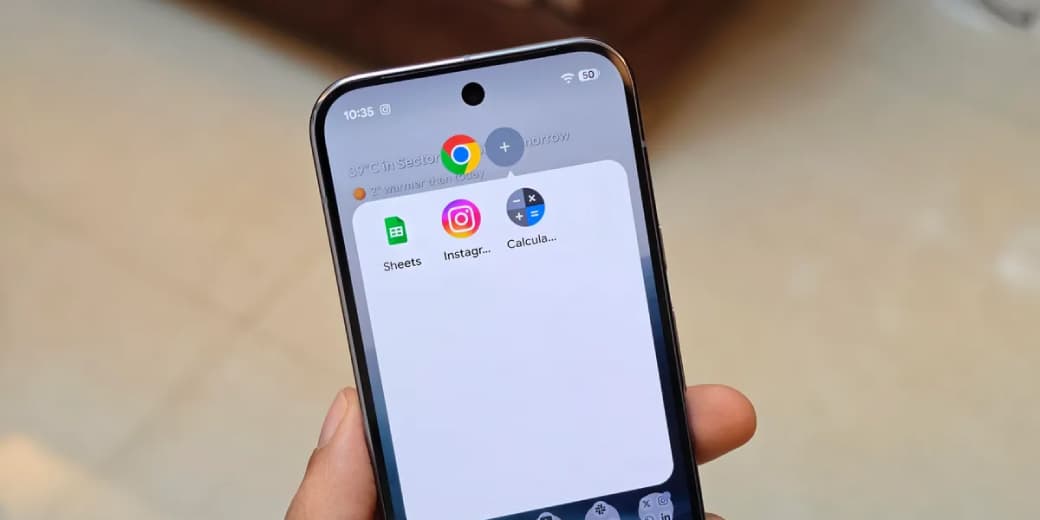
Android 17 lets users turn almost any app into a floating Bubble that stays within reach while another app remains open.
On a phone, the app collapses into a movable icon and opens as a small window. On tablets and foldables, Android adds a Bubble Bar to the taskbar so several floating apps can be organised and reopened quickly.
It is not desktop computing squeezed onto a phone. It is something more sensible: lightweight multitasking designed around the interruptions and references that define mobile work.
What you need to know
- Android 17 began rolling out to supported Pixel devices on 16 June 2026.
- Users can long-press an app icon and turn the app into a Bubble.
- Bubbles are now a proper Android windowing mode, not only a messaging feature.
- Large-screen devices receive a Bubble Bar for managing floating apps.
- The feature is most valuable for quick reference tasks such as maps, notes, calculators, authentication and video.
- Apple still offers stronger multitasking on iPad than iPhone, but Android's system works across phones, foldables and tablets.
What are Android 17 app Bubbles?
Android has used conversation Bubbles since earlier releases. A message could appear as a floating chat head above another app.
Android 17 expands the idea. Bubbles are now a general windowing mode, similar in status to split screen. A user can long-press an app on the launcher and place it inside a floating container.
Open the Bubble and the app appears in a compact window above the current activity. Close it and the Bubble remains available as a small movable icon. On larger screens, several Bubbles can sit inside a dedicated section of the taskbar.
The design is useful because it respects the difference between a primary task and a supporting task.
You may be writing an email while checking a calendar. Following a tutorial while adjusting a setting. Paying a bill while copying an account number from a message. Navigating while checking a restaurant booking.
Traditional app switching treats each activity as if it deserves the entire screen. Bubbles admit that some apps are temporary reference cards.
Why this matters more than split screen
Split screen is powerful, but it asks the user to commit screen space to two apps continuously.
That works well on a tablet. It can feel cramped on an ordinary phone, especially when a keyboard appears. Bubbles let the secondary app stay nearby without permanently shrinking the main app.
The interaction cost is also lower. Instead of opening the recent-apps screen, finding another application, switching, copying information and switching back, the user taps a persistent Bubble.
The feature does not remove split screen. It fills the space between full-screen switching and a formal multi-window layout.
That middle ground is where much of mobile productivity actually lives.
Why foldables gain the biggest advantage
Foldables have spent years looking for a software reason to justify their expensive hinges.
A larger inner display can show more content, but that alone does not create a better workflow. The operating system needs to make window management obvious and forgiving.
Android 17's Bubble Bar gives foldables a desktop-like dock without pretending the device is a laptop. A map, calculator, chat, music player and note can remain parked while the main workspace changes.
Google is also pushing developers toward adaptive layouts. On large displays, apps targeting Android 17 cannot rely on fixed orientation and non-resizable windows in the way older apps did. The system increasingly expects software to stretch, shrink and reorganise itself.
That combination matters. A floating window is only useful when the app inside it can survive being resized.
Does this prove Android is better than iOS?
For mobile multitasking, Android has the stronger philosophy.
The iPhone still treats most apps as isolated full-screen destinations. Picture in Picture supports video and some calls, while Dynamic Island exposes status and live activities. Those features are polished, but they do not let a user turn an arbitrary app into a floating utility window.
Apple has more advanced window management on iPad through Stage Manager and its newer multitasking systems. The limitation is that Apple keeps the richest model away from the iPhone.
Google's approach is more continuous. The same mental model can move from a phone to a foldable and then to a tablet, gaining more room rather than becoming a completely different operating system.
Still, Android's flexibility has a cost. Floating windows can become cluttered. Small app layouts may be awkward. Battery and pressure can rise when too many activities remain available. A feature can be powerful and still need restraint.
Freedom without interface discipline becomes a desktop covered in icons. We have already run that experiment.
What developers need to change
Developers cannot assume that an Android app will always occupy a full portrait screen.
Apps need responsive layouts, sensible minimum sizes, state preservation and controls that remain usable inside smaller windows. Navigation should not break when the width changes. Forms should handle the keyboard without burying important buttons.
Android 17 also strengthens the broader move toward adaptive apps across phones, tablets, foldables, cars and desktop-style environments.
This is not only a visual change. It affects how developers manage application state, memory, lifecycle events and input. A bubbled app can remain present while it is not the user's main focus.
The strongest apps will feel intentionally compact rather than merely reduced.
Who will actually use Bubbles?
The feature is likely to become useful for:
- Maps and travel references
- Calculators and currency conversion
- Notes and checklists
- Password managers and authentication apps
- Music and podcast controls
- Video tutorials
- Delivery tracking
- Messaging
- Sports scores
- Small business inventory or payment references
It will be less useful for complex editing, immersive games, camera work and apps that need the full display.
That is fine. A good multitasking system does not force every tool into every shape.
The tecMAMBO take
Android 17's Bubbles are not dramatic enough for a launch-stage supercut. They are more important than that.
The feature recognises how people really use phones: one main task, several brief references and constant context switching. Google has turned that behaviour into a system-level interaction instead of leaving every app to invent its own floating widget.
Apple still produces the tidier garden. Google has built more gates between the paths.
For people who use a phone as a working computer, the gates matter.
FAQ
Which phones get Android 17 app Bubbles?
Android 17 first rolled out to supported Google Pixel devices. Other manufacturers control their own release schedules and may adjust how the feature appears.
Can every Android app become a Bubble?
Android 17 is designed to let users Bubble any app from the launcher. Some apps may behave better than others depending on how well they support resizing and adaptive layouts.
Are Android 17 Bubbles the same as chat heads?
They use a familiar floating-icon idea, but Android 17 makes Bubbles a general windowing mode for applications rather than limiting them to conversations.
Does the iPhone have floating app windows?
The iPhone supports features such as Picture in Picture and Live Activities, but it does not offer a system-wide way to turn arbitrary apps into resizable floating windows.
Are Bubbles useful on small phones?
They can be useful for brief reference tasks. Complex applications may feel cramped, so split screen, full-screen switching or a larger device may still be better.
Sources
Ask MAMBO
Have a plain-English question about this topic? Send it in and we may answer it in a future guide.
Ask a questionRelated reading
 Should you care?
Google Pixel 11 Series Arrives with Tensor G6, HiLight, Better Cameras and Higher Starting Prices
Google's Pixel 11 family is official, bringing Tensor G6, brighter displays, new camera hardware, Proactive Assistance, Qi2.2 charging and the return of notification lights through HiLight.
 MAMBO Explains
Android's August system update shows how Google changes your phone without an OS upgrade
Many Android changes now arrive through Play services rather than a full Android release, making updates faster but less visible.
 Should you care?
Google says Pixel 11 prices are going up. The exact damage arrives on August 12
Google says it can no longer absorb the memory crisis and is redesigning Android to use RAM more efficiently.